

Change Cancel$ To Cancel And Vice Versa
Last updated on December 15, 2025
Change Cancel$ To Cancel And Vice Versa
Change Cancel$ To Cancel And Vice Versa
Created by
Amith, last modified by
Cathy Beckstead on Jul 26, 2023
[data-colorid=otpdlu78p7]{color:#ff5630} html[data-color-mode=dark] [data-colorid=otpdlu78p7]{color:#cf2600}[data-colorid=r9rtfi35hc]{color:#ff5630} html[data-color-mode=dark] [data-colorid=r9rtfi35hc]{color:#cf2600}[data-colorid=vuyb91x1ao]{color:#ff5630} html[data-color-mode=dark] [data-colorid=vuyb91x1ao]{color:#cf2600}[data-colorid=z46dsfug3l]{color:#ff5630} html[data-color-mode=dark] [data-colorid=z46dsfug3l]{color:#cf2600}[data-colorid=pejjadcwl4]{color:#ff5630} html[data-color-mode=dark] [data-colorid=pejjadcwl4]{color:#cf2600}[data-colorid=dz0qjpu1c7]{color:#ff5630} html[data-color-mode=dark] [data-colorid=dz0qjpu1c7]{color:#cf2600}[data-colorid=qinod36rh1]{color:#ff5630} html[data-color-mode=dark] [data-colorid=qinod36rh1]{color:#cf2600}[data-colorid=ho1ap031nu]{color:#ff5630} html[data-color-mode=dark] [data-colorid=ho1ap031nu]{color:#cf2600}You have the option to now change any appointments with a Cancel status to one with a Cancel with Charge (Cancel$) status and vice-versa.
Click the Members tab
- Select a member
- Click the Activities tab
- Search for any appointments with a Cancel or Cancel with Charge (Cancel$) status
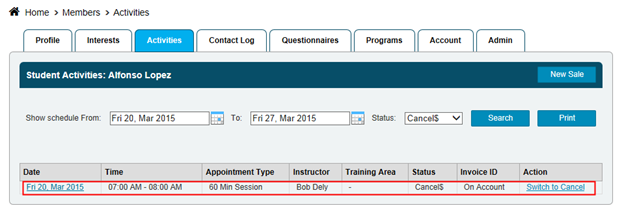
If you select Switch to Cancel in this case, the appointment's status will be changed from Cancel$ to Cancel
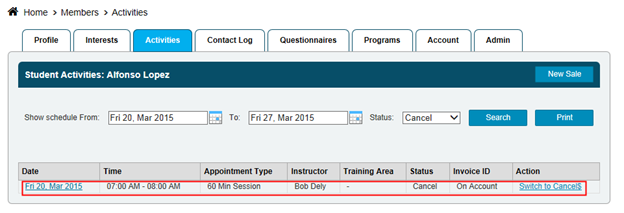
NOTE: Adjusting the appointment's status will make the applicable changes to the member's On Account tab and/or Remaining tab and also to the Staff Payroll report.
Still need help?
If you can’t find what you’re looking for, our support team is happy to help.