

Adjust Invoice
Last modified by Isaac Mejia on 2025/12/15 16:42
Last updated on December 15, 2025
Adjust Invoice
Adjust Invoice
Created by
Amith, last modified by
Cathy Beckstead on Apr 30, 2021
[data-colorid=bc7zzlajdr]{color:#ff5630} html[data-color-mode=dark] [data-colorid=bc7zzlajdr]{color:#cf2600}This feature will allow you to adjust the balance due on contract invoices.
To adjust the amount due on an invoice, follow these steps:
Open the invoice you would like to adjust. (Only Contract invoices can be adjusted this way.)
- Click on the Adjustments button towards the bottom of the invoice.
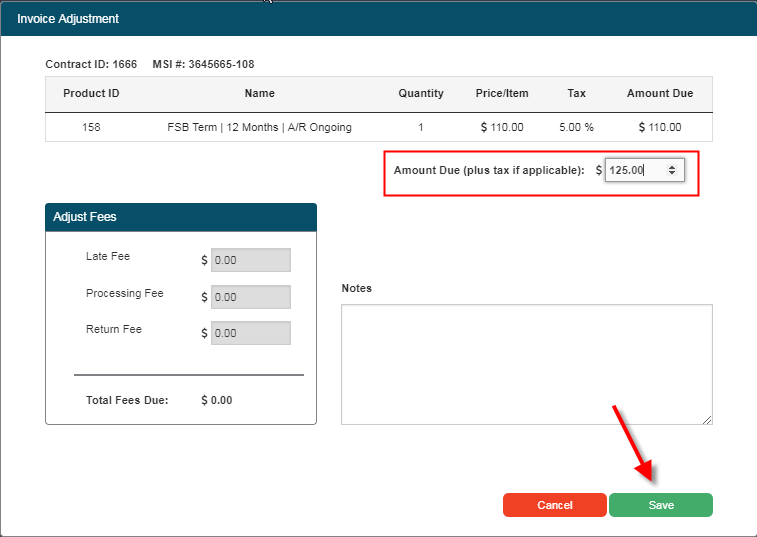
- Enter the desired amount due in the Amount Due field. (This is a post-tax amount.)
- You can enter a note in the Notes section that will be saved along with a record of the change in the sales receipt section of the invoice.
- Once you have set the correct amount, click save.
It should be noted that you cannot make adjustments to the first invoice of any contract.
Still need help?
If you can’t find what you’re looking for, our support team is happy to help.