

Contract Validation For Full Service Billing Clients
Last updated on December 15, 2025
Contract Validation For Full Service Billing Clients
Contract Validation For Full Service Billing Clients
Created by
Amith, last modified by
Cathy Beckstead on Apr 30, 2021
When submitting a contract via Member Manager for Full Service Billing by MSI, the following fields must be validated for successful integration.
Address (Street Address)
- City
- Country
- State/Province
- Zip/Postal Code
When you attempt to submit a Full Service Billing contract without the above fields filled in, Member Manager will immediately open a new window within the contract selection window. This will allow you to complete the needed fields in the member's profile, without leaving the current page.
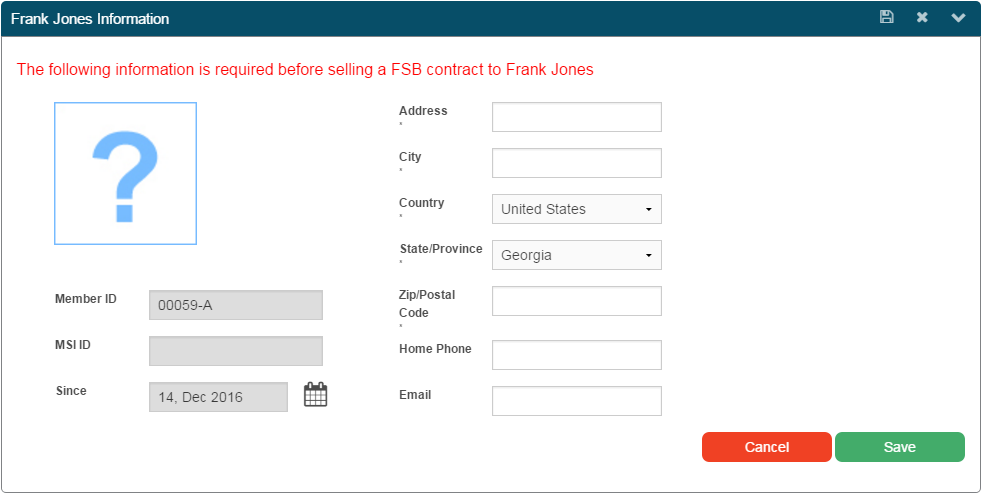
Fields marked with an asterisk are required (note that Home Phone and Email are optional). Once you've completed the missing fields, click "Save". Member Manager will add that information to the member's profile, close the window, and allow you to continue with your sale.
Not a full service billing client? Contact us for more information at sales@membersolutions.com or 888-277-4409.
Still need help?
If you can’t find what you’re looking for, our support team is happy to help.