

Create Lead Status
Last modified by Isaac Mejia on 2025/12/15 16:54
Last updated on December 15, 2025
Create Lead Status
Create Lead Status
Created by
Amith, last modified by
Cathy Beckstead on Feb 18, 2021
This help article will show you how to create a new custom Lead Status. Lead statuses are the stages that you take a lead through in your business.
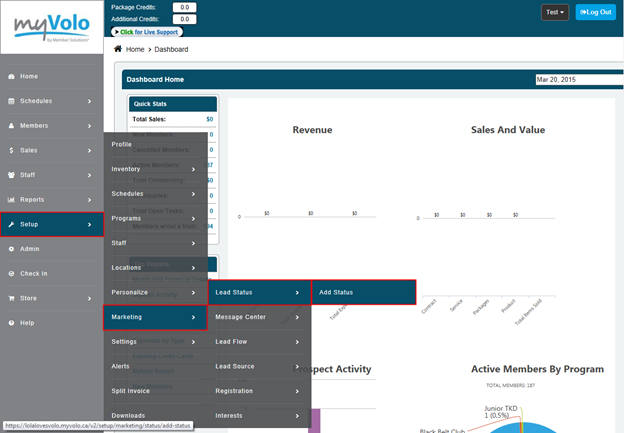
Select the Setup tab
- Select Marketing
- Select Lead Status
- Select Add Status
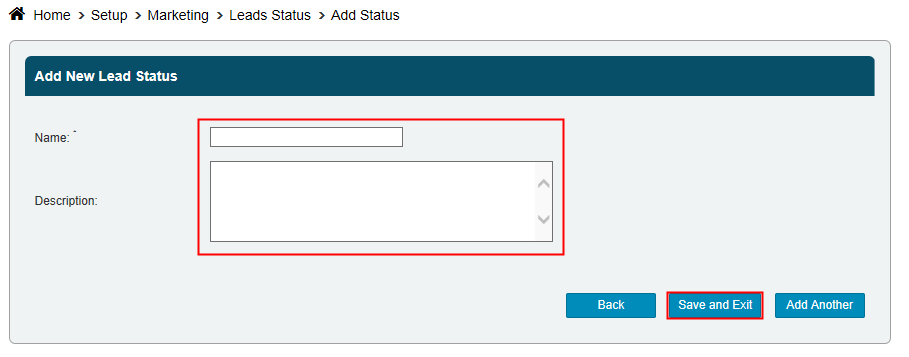
- Enter a Name
- Enter a Description - for internal purposes only
- Select Save and Exit if you're done or Add Another and repeat.
Still need help?
If you can’t find what you’re looking for, our support team is happy to help.