

Multiple Billing Profiles
Last updated on December 15, 2025
Multiple Billing Profiles
Multiple Billing Profiles
Created by
Amith, last modified by
Alicia Gontarek on Mar 18, 2021
Volo now offers you the ability to manage multiple billing profiles from just one account!
Click on the Members tab and find the client you'd like
- Click Admin
- Select Add New to add either a new Credit Card or EFT/ACH.
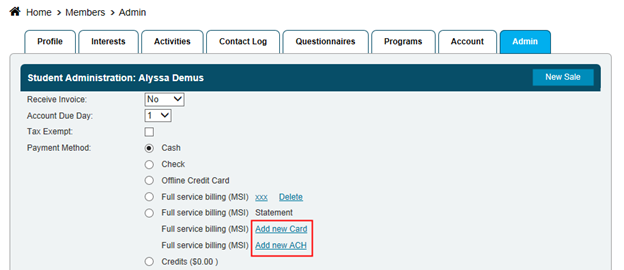
- Fill in the applicable information and select Save and Exit
Now you will be able to have multiple billing profiles per member and each different contract or package that is scheduled to renew can be specifically tied to a certain billing profile.
An example where this would be useful is if a company wants to pay for a members gym membership but they need to pay for all their personal training sessions, gym membership goes on the company card and the PT sessions can go to the personal!
Still need help?
If you can’t find what you’re looking for, our support team is happy to help.